Business process automation
Systems that take over repetitive manual work: document processing, an AI assistant for company documents, integrations between existing tools, calculations, reminders and reports.
Who it is for
Companies where people spend hours on repetitive work: copying data from one program to another, filling in spreadsheets by hand, sending the same emails, searching folders for answers, or tracking deadlines in a calendar. That work is slow, tedious and full of small mistakes, and software can usually do it. Workflow automation makes sense when the manual work costs more than building it.
What you get
- Automatic document processing: data from incoming documents, spreadsheets and emails lands where it belongs without retyping.
- An AI document assistant: staff ask about policies, contracts and manuals and get an answer with its source. The assistant can run on your own server, like DocMind.
- System integration: the programs you already use exchange data on their own, instead of a person doing it.
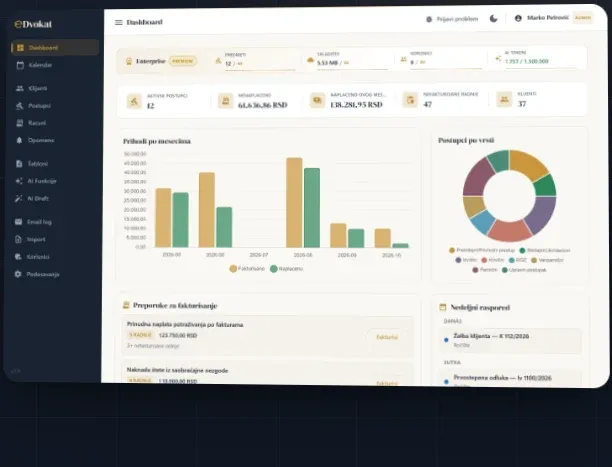
- Automatic calculations, invoices and reminders: as in eDvokat, where procedural deadlines are calculated automatically around weekends and holidays, and each bill becomes a PDF invoice and a SEF e-invoice.
- Reports that build themselves: summaries arrive on time, without assembling spreadsheets by hand.
- Moving off spreadsheets to a system with real data, roles and a change history.
How the work goes
- Map the process: with the people who do the work, we record how it really flows, step by step, and where the time goes.
- The most expensive step first: we automate the part that costs the most time or causes the most errors, not everything at once.
- Measure: after rollout we check how much work was actually removed, then pick the next step.
- Maintenance: fixes, new integrations and further development.
I build with AI-assisted development (Claude Code), backed by automated tests and a review of every change. One person is accountable for the system, from analysis to production.
Where this has been done
Projects I built that show this service in practice.
- DocMindAn AI assistant that answers questions about a company's documents and cites its sources. It runs on the company's own server with a local language model, so documents stay in-house.See the project
- eDvokatA SaaS for Serbian law firms: cases, procedural deadlines that skip weekends and holidays, fees under the official bar tariff, PDF invoices and SEF e-invoices in one place.See the project
Questions
Do we need to replace the software we already use?
Usually not. Automation typically connects the tools you already have and takes over the work between them. I suggest a new system only when an existing one cannot be connected, or when replacing it costs less than patching it.
Is our data safe when we use AI?
It depends on where the model runs. An AI assistant can run on your own server with a local language model, so documents never leave the company. That is how DocMind works. When an external AI service is acceptable, we agree on it up front and for specific data only.
How long until the first automation is running?
It depends on the process and on how the existing systems connect. That is why we start with the single most expensive step instead of everything at once. I give a timeline after the analysis, for a clearly defined scope.
Which work repeats every day at your company? Describe it in a few sentences and we start with the most expensive step.
Send an enquiry